

Case Study / 02
Censa
Design System
Building a Design System for 15+ Agri-Supply Chain SaaS Products.
From fragmented interfaces to a scalable design language connecting design, development, and product.
15+
Products
85%+
Design → Dev Parity
3 Months
To Revamp
90%
User Satisfaction ↑
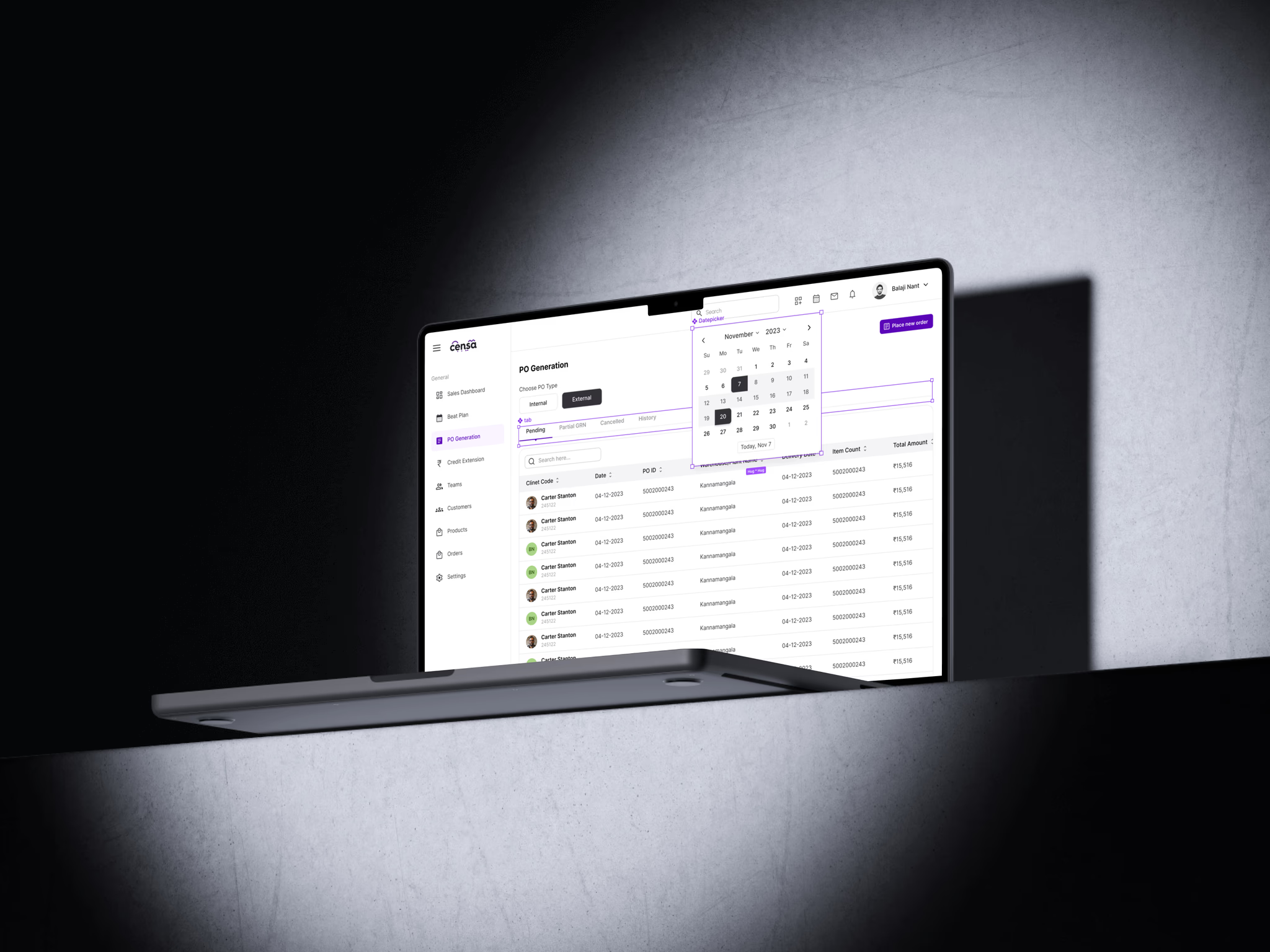
01 — Situation
15+ products. One growing ecosystem. No shared design language.
Censa's SaaS ecosystem had grown quickly, with multiple products solving different problems across the agri-supply chain. But each product had evolved independently — as the portfolio expanded, the same UI problems were being solved repeatedly.
- 15+ fragmented applications
- Different UI patterns
- 7+ visual variants
- No shared design tokens
- Inconsistent design + development
- Slower delivery
This wasn't simply a UI consistency problem. It was a scalability problem.
The organization needed a common foundation that could connect design, development and product.
02 — Task
Build the foundation for scale.
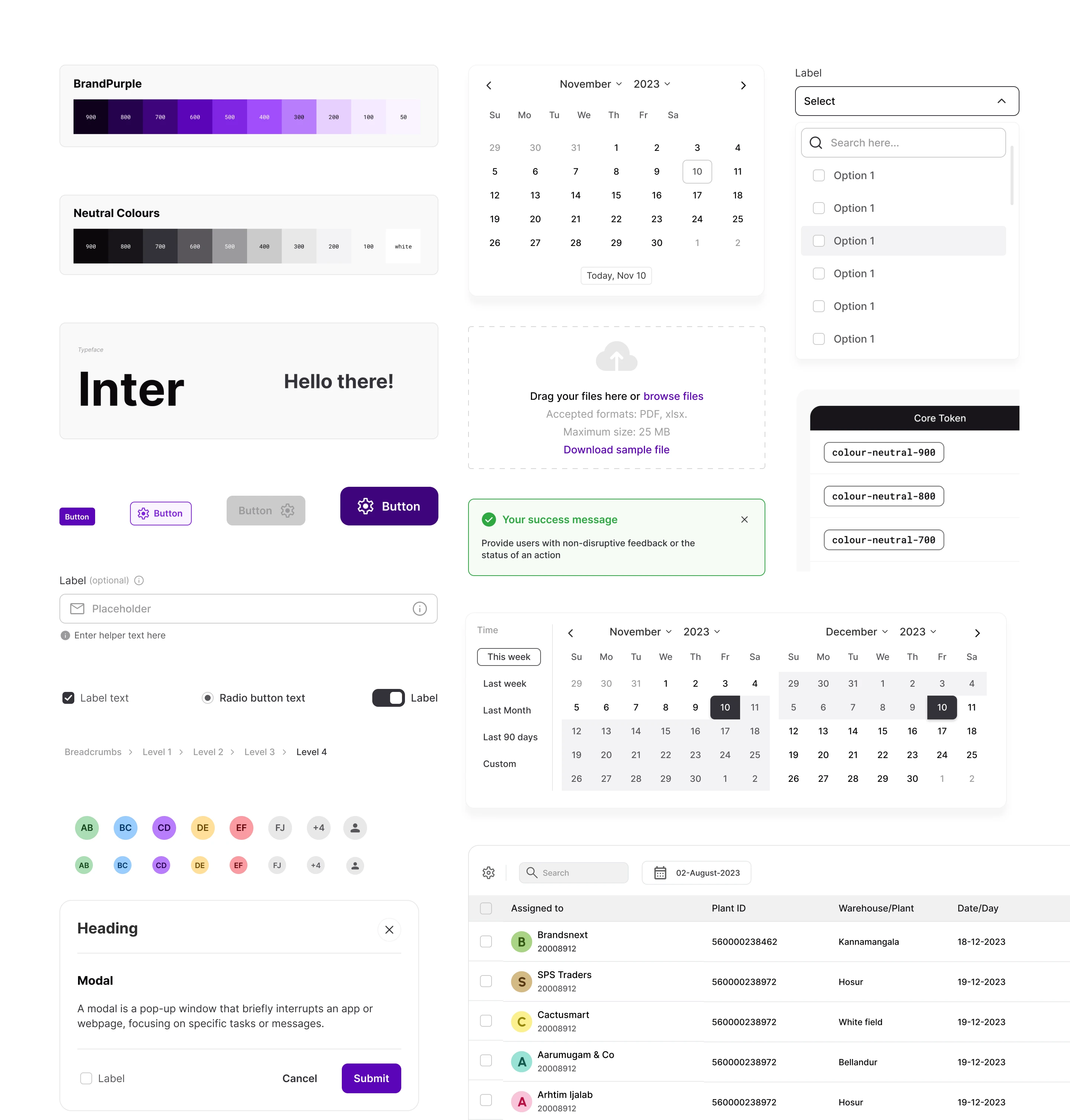
The goal wasn't to create another Figma component library. The system needed to support 15+ products, work across multiple product teams, reduce repeated design effort, improve design-development handoff, create consistency without removing product flexibility, support future product growth, and establish a maintainable governance model.
Consistency without rigidity. Speed without sacrificing quality. Design and code moving together. A system teams would actually adopt.
03 — Discovery
Before building components, I audited the ecosystem.
I started by understanding what already existed instead of immediately designing a new library — auditing 15+ applications, 23 personas, multiple product teams, existing Figma libraries, and existing frontend patterns across typography, color, spacing, iconography, components, interaction patterns and development implementation.
Visual Inconsistency
Different visual treatments across products.
Component Duplication
The same UI problem being solved multiple times.
Token Gaps
No consistent foundation for color, spacing or typography.
Handoff Friction
Design decisions were often disconnected from implementation.
Pattern Drift
Similar workflows behaved differently between products.
Team Friction
Design and development teams lacked a shared source of truth.
The audit changed the problem from “How do we make these screens consistent?” to “How do we create a system that prevents inconsistency from happening again?”
04 — Strategy
Foundations first. Components second. Adoption throughout.
The system was designed as infrastructure, not decoration.
-
01
Foundations
Color, typography, spacing, radius, elevation and other primitives.
-
02
Tokens
Translate raw visual values into reusable, meaningful system decisions.
-
03
Components
Create flexible, reusable UI components with clear states and properties.
-
04
Patterns
Combine components into repeatable interaction patterns.
-
05
Product Experiences
Allow individual products to build differentiated experiences on top of a shared foundation.
05 — Design Tokens
Tokens became the backbone of the system.
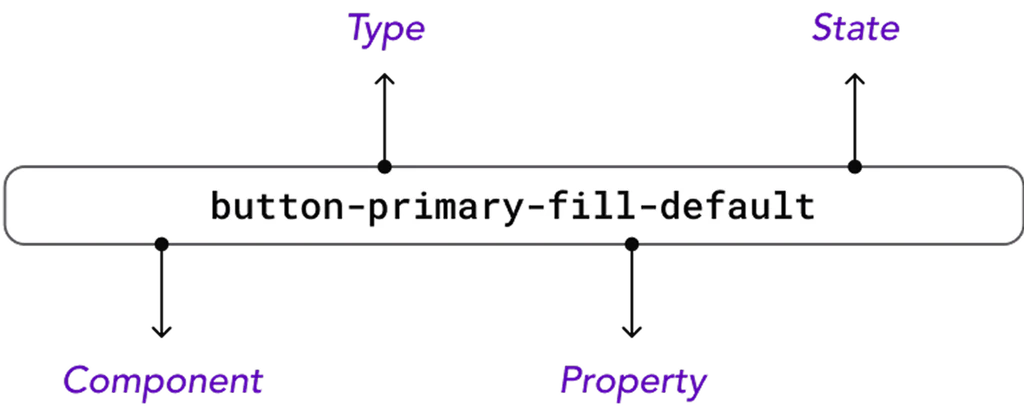
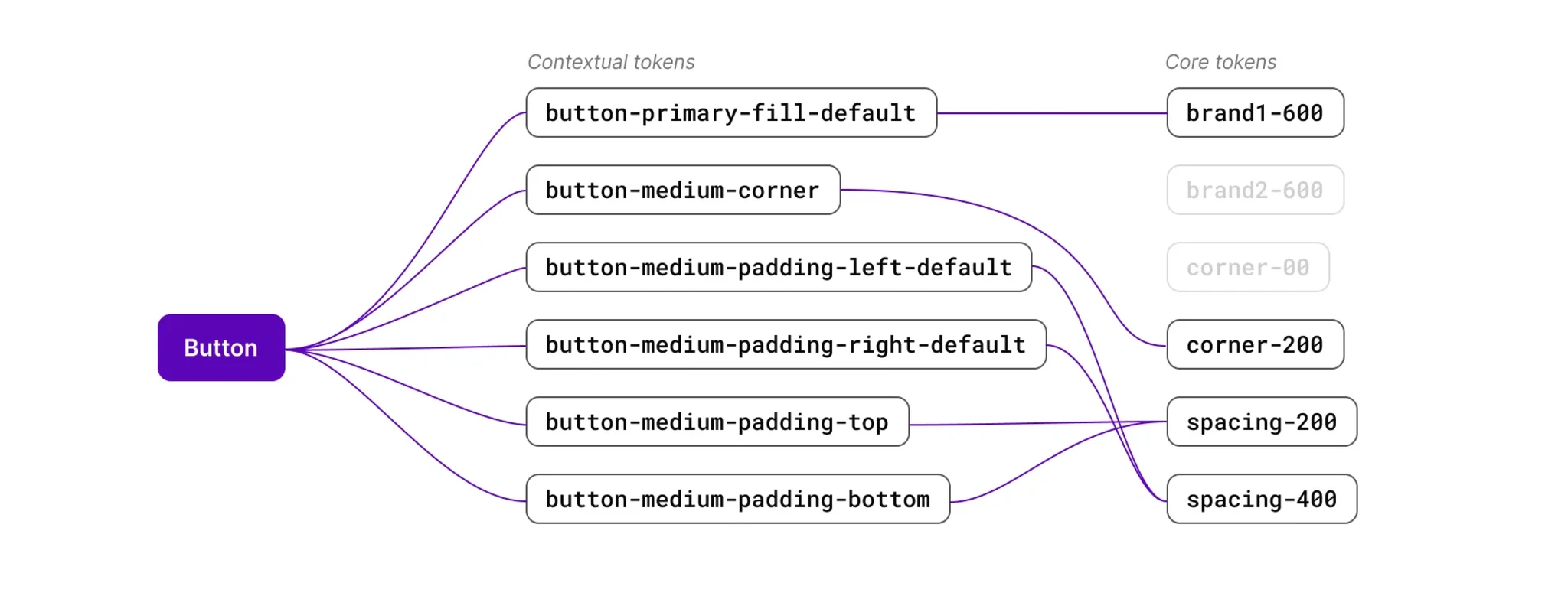
Instead of hard-coding visual values into individual components, I structured the system around reusable design tokens — creating a common vocabulary between design and development. Instead of designers discussing hex values and developers translating them manually, both teams could work with the same conceptual language.
- Color
- Typography
- Spacing
- Radius
- Elevation
- Motion
- #5A05B8
- brand-purple-600
- color-action-primary
- Button / Primary
06 — Component Architecture
Consistency without killing flexibility.
The component system was designed around reusable foundations while allowing individual products to adapt components to their context — built as building blocks rather than isolated visual objects.
- Component
- Variants
- Properties
- States
- Responsive Behavior
- Accessibility
- Usage Guidance
Design Principles
-
01
Clarity Over Cleverness
-
02
Consistency Through Reusable Decisions
-
03
Flexibility Without Unnecessary Variants
-
04
Accessibility as Part of the Component
-
05
Documentation as Part of the System
07 — Design → Code
The system had to work in code, not just in Figma.
A design system only becomes scalable when the design and development implementations stay aligned. The team built a React component library in Storybook and connected the development implementation with the Figma component system — Storybook became the developer-facing source of truth for component behavior, variants, props and usage.
Before
- Figma
- Developer Interpretation
- Custom Implementation
- QA Correction
- Visual Drift
After
- Figma
- Shared Tokens and React Component Library
- Shared Component Model and Props & Variants
- Storybook Documentation
- Usage Guidelines
85%+
Design-to-Development Parity
The objective wasn't simply to “hand off” design. The objective was to make design and development move in lockstep.
08 — Governance
A design system without governance eventually becomes another UI library.
Creating components was only part of the work. The system also needed rules for how it would evolve.
Version Control
Changes were tracked and released intentionally.
Contribution Model
Teams had a clear way to propose improvements.
Documentation
Components included usage guidance and do/don't examples.
Changelogs
Teams could understand what changed between releases.
Feedback Loop
Real product usage informed future system improvements.
Governance turned the design system from a static library into a living product.
- Build
- Document
- Test
- Adopt
- Collect Feedback
- Improve
- Release
09 — Adoption
The hardest part wasn't building the system. It was getting teams to use it.
A technically strong design system has little value if product teams continue creating their own components. Adoption required cross-functional alignment, clear documentation, easy-to-use components, developer confidence, demonstrating value, continuous feedback, versioned releases, and support during migration.
Rather than forcing adoption through rules alone, the system needed to make the correct path the easiest path.
- Show Value
- Make It Easy
- Support Teams
- Collect Feedback
- Improve System
- Release Again
10 — Validation
The system was validated through real product behavior.
Design decisions weren't evaluated only through visual preference. The team used A/B testing, heatmaps, user surveys, task metrics, product feedback, design reviews, and developer feedback.
Clarity
Does the interface communicate hierarchy quickly?
Efficiency
Does consistency reduce cognitive and interaction cost?
Adoption
Can teams understand and reuse the system without additional explanation?
Clarity over cleverness. Performance through consistency. Modularity without rigidity.
11 — Result
Result
85%+
Design → Dev Parity
15+
Products
3 Months
To Revamp the Ecosystem
25%
User Satisfaction Increase
12 — Real Impact
The biggest outcome wasn't consistency. It was leverage.
The system allowed design teams to stop repeatedly solving foundational problems and spend more time solving product problems.
For Designers
- Less repetitive UI work
- Faster exploration
- Reusable patterns
- Clearer design decisions
For Developers
- Clearer implementation
- Reusable React components
- Better design-code parity
- Reduced ambiguity
For Product Teams
- Faster product evolution
- More consistent experiences
- Shared language
- Scalable foundations
For Users
- More predictable interactions
- Improved visual hierarchy
- More coherent product experiences
The Design System became the shared language connecting design, engineering and product.
13 — Learnings
Learnings
-
01
A Design System Is a Product
It needs users, feedback, iteration and continuous improvement.
-
02
Consistency Is Not the End Goal
Consistency creates the foundation. The real goal is better product experiences.
-
03
Design + Code Must Evolve Together
A Figma library without implementation quickly loses value.
-
04
Governance Matters
Without ownership and contribution models, systems fragment over time.
-
05
Adoption Is a Design Problem
The system needs to be understandable, useful and easy enough for teams to choose.
14 — My Contribution
I didn't just design the components. I helped design the system around them.
I co-led the initiative with two core designers, working alongside 1 Lead Product Designer, 3 Core Product Designers and 2 UX Researchers — plus cross-functional collaboration with Product Managers, Engineering Managers, Developers and business stakeholders.
01
System Architecture
Defined the overall structure and hierarchy of the design system.
02
Design Tokens
Created the token foundation for color, typography, spacing and other reusable values.
03
Component Strategy
Defined reusable components, variants, states and properties.
04
Design → Development
Worked with engineering to establish Storybook and React alignment.
05
Governance
Helped establish documentation, contribution and versioning practices.
06
Adoption
Worked with cross-functional teams to drive system adoption across products.
07
Validation
Used research, testing and product feedback to improve system decisions.
08
Scalability
Designed the system to support 15+ SaaS products rather than solving for one application.
My role was to bridge the gap between visual design, product thinking and implementation — turning a collection of interfaces into a scalable product foundation.
Next Case Study →
Outgrow — Smart Irrigation Planner